Researcher Bounty Boosts
Offer one researcher a private, time-limited bounty multiplier. Each qualifying finding is priced by its place in line, never below the rate it had when it was sent, with a maximum extra per report.
Reward useful findings
A bounty boost gives one researcher a private, time-limited reason to keep reporting to your vulnerability disclosure program (VDP). Each qualifying finding they send during the boost is priced by its place in line. On the default ramp, the 1st finding pays the standard bounty, the 2nd and 3rd pay up to 1.1×, the 4th and 5th up to 1.25×, and every finding after that up to 1.5×. A maximum extra per report keeps each payout predictable.
Findings count in the order the researcher sends them, and that order sets each finding’s place in line. Sending several findings together fills the same places in line as spacing them out, and every report that still counts keeps at least the rate it had when it was sent.
A boost belongs to one program and one researcher. It doesn’t publish the researcher’s identity or create a public competition. The researcher doesn’t need a paid subscription. Your team needs an active Kit subscription to use the bounty workflow, and only staff who can approve bounties can start, extend or end a boost.
For day-by-day cases with real numbers, see Worked examples.
Start a boost
Open the researcher in your program and select Start boost. The form asks four things:
- Ramp: how the rate rises with each qualifying finding. Standard is preselected.
- Counts from: Medium+ (the default) or High+.
- Length: 14, 30 (the default), 60 or 90 days, or Other for any length from 7 to 90 days. The form shows the end in UTC and in your time zone.
- Maximum extra per report: the most the boost adds on top of any one approved bounty, in the program’s currency.
Below the inputs, a table shows what the researcher could earn at each place in line, at a base bounty from your bounty matrix. The What if… row plays out six common cases with your numbers. The summary line states your exposure, for example “Standard · 30 days · up to 1.5× · €200 per report · no total limit”. Select Start 30-day boost to confirm.
Terms can’t be changed after you start. You can extend the boost or end it. Only one live boost can apply to a researcher in the same program.
Important
The cap limits the extra on each report, not the total you may owe during the boost. Every qualifying report can earn up to the cap, and there is no total limit.
Pick a ramp
| Ramp | 1st finding | 2nd–3rd | 4th–5th | 6th and later |
|---|---|---|---|---|
| Standard: a balanced default | Standard bounty | Up to 1.1× | Up to 1.25× | Up to 1.5× |
| Gentle: a light thank-you | Standard bounty | Up to 1.1× | Up to 1.25× | Up to 1.25× |
| Steep: for a sustained push | Standard bounty | Up to 1.25× | Up to 1.5× | Up to 2× |
| Welcome: flat, so the first finding is boosted too | Up to 1.25× | Up to 1.25× | Up to 1.25× | Up to 1.25× |
Rates read up to because the cap can hold the extra lower.
Pick what counts
Medium+ counts findings rated Medium, High, Critical or Super critical. High+ counts only High and above. A finding rated below the boost’s severity floor pays its standard bounty, doesn’t count toward the ramp, and is approved as usual.
Notify the researcher
Email the researcher is on by default. The personal message is prefilled in the researcher’s language; edit it to make it personal (up to 2,000 characters). The form shows the boost terms exactly as the email will show them. Turn the email off to start the boost silently. The boost still shows in the researcher’s portal.
The email always lists the same terms as the form preview: the ramp, how place in line works, what counts, the maximum extra per report and the exact deadline in UTC. Its Good to know section covers three more things. Your team approves each bounty and the extra is added on top, and a later report’s bounty is approved once the earlier reports in the boost are decided. Findings sent before the boost started don’t count. The cutoff is exact: a report sent at the end time or later isn’t part of the boost, and if you end the boost early, reports already sent keep their terms. Your note replaces only the personal message. It can’t remove or change the financial terms.
If the daily outbound email limit is reached, Kit retries after the next daily reset while the boost is still active. If sending is delayed until after the boost expires or ends, Kit skips the email. A queued or attempted send doesn’t prove inbox delivery.
How finding order sets the rate
A finding qualifies when staff have validated the report and given it an official severity at or above the boost’s Counts from setting. It must be sent during the boost, to this program, by this researcher. A researcher’s claimed severity, or a report that has only been triaged, doesn’t qualify.
Kit counts qualifying findings in the order the researcher sent them, and a report’s place in that line sets its rate. With three qualifying findings sent before it, a report is finding #4. Kit works out the place when the bounty is approved, counting the earlier reports that qualify at that moment.
The rate a report had when it was sent stays as its floor. That rate comes from the findings already validated at the time, so a report sent after earlier findings were validated keeps that higher rate even if one of them is later lowered or dismissed. Kit pays the higher of the two, so a report keeps at least the rate it had when it was sent as long as it stays validated at or above the severity floor.
Kit labels the reports in a boost R1, R2, R3… in the order they were sent. The finding number counts only qualifying reports, so R4 is finding #3 when one earlier report was dismissed.
Earlier reports are decided first
A boosted report’s bounty can’t be approved while an earlier report in the same boost is still undecided: not yet validated and not closed. On the report page and the bounty form, Approve is replaced by Decide R2 first, which links to the report holding it up. Accepting a bounty proposal and approving through MCP are refused the same way.
Once the earlier reports are decided, the report’s place is final, so an approved rate never needs a top-up later. The wait applies only to reports that count toward the boost. A report rated below the severity floor, or paid as a discretionary bonus, is approved as usual.
What doesn’t count
Findings rated below the severity floor, duplicates, dismissed or informative reports, retests, sample reports and discretionary bonuses don’t count toward the ramp and earn no extra. Neither does anything sent before the boost started. Each qualifying report counts once: reopening it, validating it again or approving its bounty again adds no second finding. An invalid report doesn’t reset other progress.
When a severity changes
Before approval, a report rated below the severity floor stops counting and earns no extra. The reports sent after it move down one place in line, but none that still counts drops below the rate it had when it was sent. Raising a report back to the floor or above makes it count again.
Approved bounties keep their rate and extra. A later change to an earlier report doesn’t touch them; the next approval uses the new order. The one exception is the approved report itself: if its bounty was approved at a boosted rate and staff then lower its severity below the floor, its payout is held for review until the award is corrected. See Correct an award after eligibility changes.
Extend a boost
Select Extend boost on the researcher’s boost card, choose how many days to add, and confirm. The end only moves later. A boost runs at most 90 days from its start, so the form offers the days that are left. Only an active boost can be extended; an ended or expired one can’t.
The ramp, what counts, the cap and the terms of reports already sent stay the same. Kit emails the researcher the new deadline, even if you started the boost without an email. Each extension is listed in the boost’s history.
When a boost ends
A boost includes its start time and excludes its end time. The researcher sees the deadline in their own time zone and in UTC.
A report sent before the end can still qualify for the boost, even if staff validate it or approve its bounty weeks later. While it counts, it keeps its rate floor. A report sent at or after the end isn’t part of the boost and pays its standard bounty.
Authorized staff can end a boost early with End boost. That stops new reports from joining; reports already sent keep their terms. Kit doesn’t email the researcher when you end a boost early. A later boost starts a new count.
After a boost expires or ends, its card stays in the researcher’s portal for 30 days. It shows when the boost ended and the reports sent before then, with their rates and payout status.
What the researcher sees
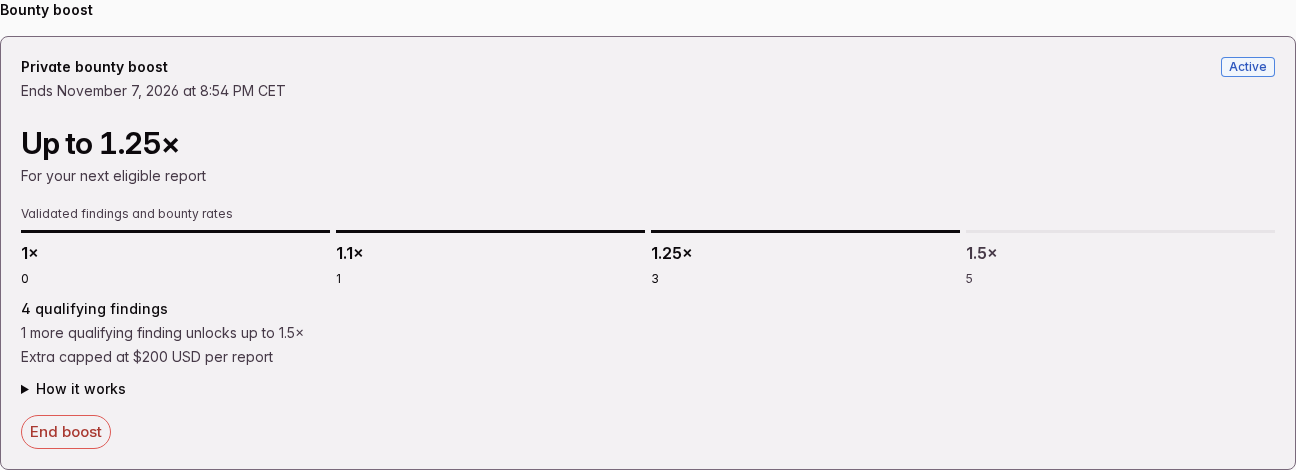
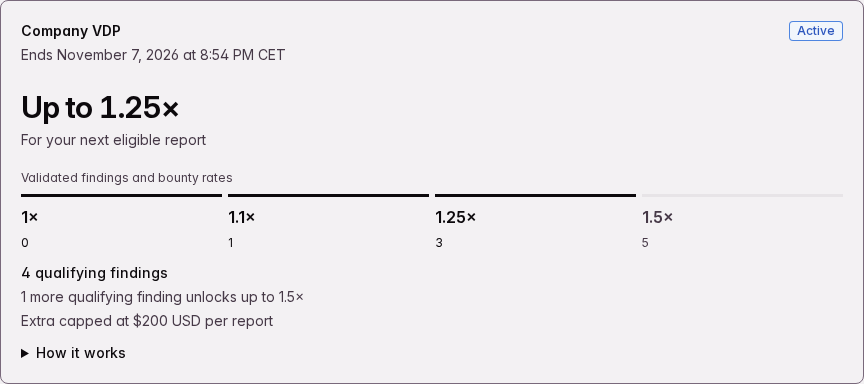
While the boost runs, the researcher’s portal shows the rate for their next report, the deadline in their time zone and in UTC, an example payout, and the rate milestones with progress from validated findings and open reports. Your reports in this boost lists each report with its finding number, its rate and why. Good to know covers how place in line works, what doesn’t count, the cap, what happens when the boost ends, and severity changes.
Only the rate a report had when it was sent is a promise. While earlier reports are still open, a report shows its expected rate with “if your earlier reports qualify”, and notes that the rate is final once those reports are decided, at least its floor. The next-report rate counts validated findings only, with a second line for what open reports would add if they qualify.
What staff see on a report
Bounty approvers see a slim Boost row in the report’s right rail, such as “Finding #3 · up to 1.1×” or “Waits for R2”. Selecting it shows the finding number and why, the rate now and the rate locked at submission, the cap and the extra at the program’s bounty for that severity, and what could still change. Members who can’t approve bounties don’t see the row.
Open boost details shows the whole boost: its terms, every report in submission order with its finding number and rates, the extra approved so far, and the boost’s history.
When a researcher submits a report during a boost, the new-report Slack DM shows ⚡ Submitted during a bounty boost if you’re on call and can approve bounties for that report. Open the report in Kit to check eligibility and terms.
Approve the base, extra and total
Enter the base bounty using your normal bounty matrix and approval rules. The form states the report’s rate in one line, such as “Finding #3 in this boost → up to 1.1×”, calculates the extra and shows the total payable. When the extra is zero, it says why: the extra starts at a later finding, the report is rated below the severity floor, bonuses are paid as entered, or the currency doesn’t match.
The extra is the base times the rate minus one, rounded to the nearest cent, and never more than the cap:
extra = min(base × (rate − 1), cap)
For example, at 1.5× with a €200 cap:
| Base bounty | Calculated extra | Extra after cap | Total payable |
|---|---|---|---|
| €300 | €150 | €150 | €450 |
| €1,000 | €500 | €200 | €1,200 |
At 1.1×, a €456.75 base adds €45.68. The award currency must match the boost currency; Kit doesn’t convert the cap between currencies.
Staff review and approve the total. A boost doesn’t validate a report, approve an award or send a payment by itself. The normal payout, adjustment and revocation safeguards still apply.
Correct an award after eligibility changes
If a bounty approved at a boosted rate loses eligibility after a severity correction or a change of researcher, its payout is held until the award is corrected. An ordinary amount adjustment keeps the award’s approved rate and cap, so it can’t remove that extra.
Open Revoke bounty, review the current total and enter a reason. Revocation leaves the report’s decision and status unchanged. Kit records a compensating debit in the ledger for the revoked total. You can then approve a fresh bounty: if the report no longer qualifies for the boost, the new award receives no extra. The old credit, the revocation debit and the new credit leave the ledger with the corrected amount owed.
Revocation is prohibited while a payout is pending or processing, and after it has completed. Don’t mark a payout as failed just to bypass this safeguard.
Through MCP, call csirt_revoke_bounty with report_id, a reason, expected_amount_cents (the current total) and expected_award_id (the current award’s prefixed ID). Review the award with the user first. If its amount or identity changes, Kit refuses the revocation; fetch the current award and confirm again. Use csirt_approve_bounty separately for the replacement.
Worked examples
Every example uses the same boost and program, so the numbers compare:
- Ramp Standard, counts from Medium+, 30 days, a maximum extra of €200 per report.
- The program pays €100 for a Low, €300 for a Medium, €1,000 for a High and €3,000 for a Critical.
- The boost starts on day 0 at 14:32 UTC and ends on day 30 at 14:32 UTC.
- The researcher is Nadia. Her reports are R1, R2, R3… in the order she sends them.
Pays is the approved total: the base plus the extra.
First finding
| Day | What happens | Pays |
|---|---|---|
| 4 | Nadia sends R1 (High). | |
| 9 | You validate R1 and approve it as finding #1, which Standard pays at the standard bounty. | €1,000 |
| 14 | Nadia sends R2 (High). One finding already counts, so R2 is sent at up to 1.1×. | |
| 18 | You validate R2 and approve it as finding #2 at 1.1×: €1,000 × 0.1 = €100 extra. | €1,100 |
Note
Operator: On Standard, Gentle and Steep the extra starts at finding #2, so R1 costs the standard €1,000. To boost the first finding too, pick Welcome: R1 would pay up to 1.25×, here €1,200 with the €200 cap.
Researcher: Nadia’s card says the extra starts at her finding #2, at up to 1.1×, and R1 shows “Finding #1 · standard rate”. Once R1 is validated, her next-report rate becomes up to 1.1×.
Several at once
| Day | What happens | Pays |
|---|---|---|
| 2 | Nadia sends R1, R2 and R3 (all High) within an hour. | |
| 9 | You validate R2 first. Its bounty can’t be approved yet: the button reads Decide R1 first. | |
| 10 | You validate R1 and approve it as finding #1. | €1,000 |
| 10 | R2 can now be approved, as finding #2 at 1.1×. | €1,100 |
| 11 | You validate R3 and approve it as finding #3 at 1.1×. | €1,100 |
| 12 | Nadia sends R4 (High). | |
| 16 | You validate R4 and approve it as finding #4 at up to 1.25×. 1.25× would add €250; the cap holds it to €200. | €1,200 |
Four Highs pay €4,400, €400 of it extra.
Note
Operator: Three Highs sent on day 2 fill the same places in line as the same three spread over two weeks, so they cost the same, and you have all three on day 2. You approve boost reports in order, so a later report waits until the earlier ones are decided.
Researcher: Sending R1, R2 and R3 together filled the same places in line as spacing them out, so they paid the same. Until R1 was decided, her card showed R2 as “Finding #2 · up to 1.1× if your earlier reports qualify”, at least the standard bounty.
Cap hit
| Day | What happens | Pays |
|---|---|---|
| 1–12 | Nadia sends R1 to R5 (all High). | |
| 5–16 | You validate and approve them in order, as findings #1 to #5. | €1,000, €1,100, €1,100, €1,200, €1,200 |
| 18 | Nadia sends R6 (Critical). | |
| 20 | You approve R6 as finding #6 at up to 1.5×. 1.5× of €3,000 would add €1,500; the cap holds it to €200. | €3,200 |
| 22 | Nadia sends R7 (Medium). | |
| 25 | You approve R7 as finding #7 at 1.5×: €300 × 0.5 = €150, under the cap. | €450 |
Seven reports pay €9,250, €950 of it extra.
Note
Operator: The cap applies to each report, not to the boost: every qualifying report can add up to €200, however many Nadia sends. On a high-value finding the cap does most of the work, so R6 adds €200, not €1,500.
Researcher: Nadia’s card and each of her reports say the extra is capped at €200 per report, so €3,200 for R6 is what she was told to expect.
Sent after the end
| When | What happens | Pays |
|---|---|---|
| Days 3–20 | R1 to R3 (all High) are validated and approved as findings #1 to #3. | €1,000, €1,100, €1,100 |
| Day 30, 14:31 UTC | Nadia sends R4 (High). | |
| Day 30, 14:32 UTC | The boost ends. | |
| Day 30, 14:33 UTC | Nadia sends R5 (High). It isn’t part of the boost. | |
| Day 33 | You validate R4 and approve it as finding #4 at up to 1.25×, with the extra capped at €200. | €1,200 |
| Day 33 | You validate R5 and approve it at the standard bounty. | €1,000 |
Note
Operator: What counts is when a report was sent, not when you validate it. R4 arrived a minute before the end, so it keeps its place though you validated it three days later. The end moment itself is excluded: a report sent at exactly 14:32 UTC isn’t boosted.
Researcher: Nadia’s card shows the deadline in her time zone and in UTC. R4 shows “Finding #4 · up to 1.25×” until it’s approved; R5 is an ordinary report with no boost terms.
Severity lowered
| Day | What happens | Pays |
|---|---|---|
| 3 | Nadia sends R1, R2 and R3 (all High). | |
| 8–10 | You validate and approve them as findings #1 to #3. | €1,000, €1,100, €1,100 |
| 11 | Nadia sends R4 (High). Three findings count, so R4 is sent at up to 1.25×. | |
| 12 | A retest shows R2 is only Low. You lower it, so R2 stops counting. Its approved €1,100 can’t be paid until you correct the award. | |
| 13 | You revoke R2’s award and approve a fresh Low bounty, with no extra. | €100 |
| 16 | You approve R4. By order it is now finding #3, up to 1.1×, but it was sent at up to 1.25× and Kit pays the higher: 1.25× would add €250, capped at €200. | €1,200 |
R1 and R3 keep their approved bounties.
Note
Operator: Lowering a report below the severity floor removes its extra and moves the reports after it down one place, never below the rate they were sent at while they still count. Approved bounties don’t change, except the lowered report’s own: it was approved at a boosted rate, so its payout waits until you revoke it and approve it again.
Researcher: R2 earns its Low bounty with no extra and no longer counts, so Nadia’s next-report rate falls from up to 1.25× to up to 1.1× until R4 is validated. R4 says it “keeps the 1.25× it had when it was sent”.
Ended early
| Day | What happens | Pays |
|---|---|---|
| 4 | Nadia sends R1 (High). | |
| 8 | Nadia sends R2 (High). | |
| 9 | You validate R1 and approve it as finding #1. | €1,000 |
| 12 | You end the boost. Kit sends Nadia no email. | |
| 13 | Nadia sends R3 (High). It isn’t part of the boost. | |
| 15 | You validate R2 and approve it as finding #2 at 1.1×. It was sent before the end, so it can still count. | €1,100 |
| 16 | You validate R3 and approve it at the standard bounty. | €1,000 |
| 42 | The boost’s card leaves Nadia’s portal, 30 days after the end. |
Note
Operator: Ending early stops new reports from joining the boost. Reports already sent can still qualify if you validate them after the end. While they count, they keep their rate floors.
Researcher: Nadia’s card says the program ended the boost early and lists R1 and R2 with their rates and payout status: “Your submitted reports keep their terms.” No email goes out, so if you want to explain why, message her yourself.
Use MCP with the same controls
Authorized staff can start a boost with csirt_create_bounty_boost, using researcher_id, bonus_cap_cents and, optionally, duration_days, currency, preset (standard, gentle, steep or welcome), minimum_severity (medium or high), notification_enabled and notification_message. Read boosts with csirt_list_bounty_boosts using page, limit and an optional researcher_id filter; extend one with csirt_extend_bounty_boost using boost_id and days; end one with csirt_end_bounty_boost using boost_id.
csirt_get_report returns a bounty_boost block for a report sent during a boost: its finding_number, the rate approval will use (rate_basis_points), and undecided_earlier_report_ids, the earlier reports to decide first. For boosted approval, provide base_amount_cents so Kit can calculate the extra. The existing amount_cents input means the total, not a base to multiply again; don’t provide both inputs. Approval is refused while earlier reports in the boost are undecided, and the error names them. Human confirmation and financial permissions remain required. See VDP AI integration for agent access.
When approving through MCP with base_amount_cents, you must also provide expected_total_amount_cents, even if the report currently earns no boost extra. First review the base, extra and total with the user. If the calculated total changes before approval, Kit refuses the award; review the updated amounts before confirming again. The existing amount_cents input still means the total and doesn’t require this additional field.