Recommended Credentials
Flag a credential you value on a job posting. Candidates get one optional email with free courses and can share evidence they already hold it. Kit never scores, ranks, or filters on it.
Why It Matters
“Familiarity with AI tools is a plus” sits in a job description and nobody acts on it. A recommended credential names the same thing at the moment a candidate is paying attention, just after they applied, and points them at free courses. Candidates who already hold it can say so; candidates who don’t can go and get it.
The credential is optional. Kit sends the invitation automatically but does not use the response for scoring, ranking, or filtering.
Enabling It on a Job Posting
The Recommended credentials section sits on the job posting form, when you create or edit a posting. It is off by default: no credential is ticked, no candidate is emailed.
The help text on the form states the rule the whole feature runs on:
Tick a credential you would value for this role. Everyone who applies after you save gets one automatic email inviting them to share it; anyone who already applied is not emailed. You see exactly what they send, and Kit never verifies, scores, ranks, or filters it.
Tick the credentials you would value and save. The catalogue is curated by Kit, so the courses behind each credential are the same for every account. It holds nine entries, laid out under role-family headings: Any role first, then Engineering, Data, Marketing, Sales and Customer support.
The headings only group the list. Nothing is filtered, hidden, or pre-selected on the strength of your job title: every credential stays tickable on every posting, because showing you one you do not need costs a line of scrolling, while hiding the one you did need costs you the feature.
Only the Any role group is open when the form loads. The five role-specific groups sit behind one control, Show 5 role-specific credentials, which reads Hide role-specific credentials once they are open. They open by themselves whenever the posting already recommends something inside them.
| Group | Credentials |
|---|---|
| Any role | AI literacy · Cybersecurity basics · Collaboration tools · Communicating at work |
| Engineering | Cloud fundamentals |
| Data | Working with data |
| Marketing | Digital marketing |
| Sales | Inbound sales |
| Customer support | Customer support |
Next to each credential is an information button. Open it before you tick the box: it shows what the credential covers, every free course behind it with its cost and length, what the candidate will be asked to do, and what comes back to you. Nothing in it changes the posting; it is there so you are not recommending a label you have not read.
What the Candidate Receives
A few minutes after their application is submitted, the candidate gets one email. It names your company, the role, and the credential you flagged, lists free courses that cover it, and offers a page where they can share evidence they already hold it.
The email says plainly that this is optional, that doing nothing does not weaken the application they already sent, and that it is the only email Kit will send them about it. There are no reminders, no resend, and no deadline.
On the page they can either paste a link to a public badge or certificate (only from recognised credential sites) or upload the certificate as a PDF, PNG, JPEG or WebP. They can also decline, or close the tab.
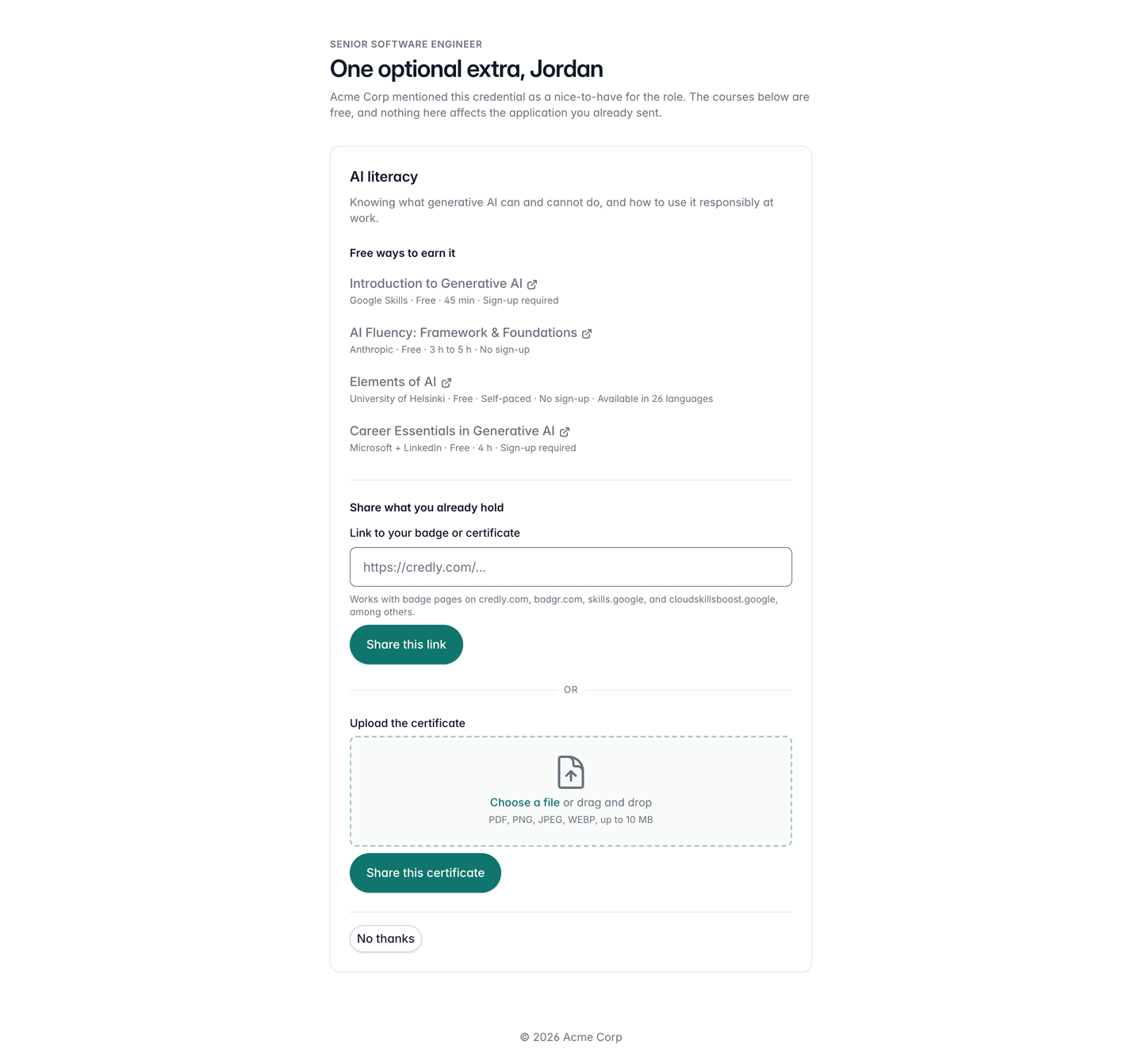
The email and the page are sent in the posting’s communication language and carry your branding, so a candidate never leaves your hiring process to read Kit’s own documentation.
What You See Back
If the candidate shares something, a Credentials the candidate shared section appears on their application, under the heading’s note:
Sent by the candidate, unverified. Nothing here is scored, ranked, or filtered.
Each entry shows the credential, the date it was shared, and the evidence itself:
- A link: the host is shown first, in bold, so you decide whether to open it before you click. The full URL sits underneath.
- A file: an attachment you download and open yourself, like any other file on the application.
The applications list also puts a small graduation-cap icon on rows where something was shared, so you can spot them without opening every application.
Judging what you see is entirely your call. Kit never opens the link, never reads the file, and never changes a candidate’s position in your pipeline because of either.
Note
Ignoring the email, or declining on the page, is invisible to you. There is no “declined” badge and no “no response” marker; an absent section means only that nothing was shared, which is exactly what it means for the majority of candidates. A candidate is never penalised for it.